7 Real Business Use Cases
Imagine a digital team that researches competitors, prepares sales quotations, answers customer questions, monitors inventory, generates reports and helps your marketing team plan campaigns. An AI agent can interpret a goal, gather information, use approved tools, perform multiple steps and check its progress.
At SerenialTech, we work across software development, mobile applications, cloud systems and connected products. These capabilities can support businesses exploring AI-powered applications and workflow automation.
What Is an AI Agent?
An AI agent is a software system that uses artificial intelligence to pursue a defined goal by gathering information, selecting actions and interacting with approved tools or systems.
For example, when a customer requests a quotation, an agent can extract product requirements, retrieve approved pricing, identify missing details, prepare a draft quote and send it to an authorised employee for approval.
Most business agents combine an AI model, instructions and business rules, knowledge sources, tool integrations, workflow orchestration, monitoring and approval controls.
If you are planning a custom AI-powered application, explore SerenialTech’s mobile app development services.
AI Agent vs. Chatbot: What’s the Difference?
A chatbot is primarily designed to interact with people through conversation. An AI agent can go further by planning and carrying out a sequence of actions using connected tools. Some modern chatbots also include agent capabilities.
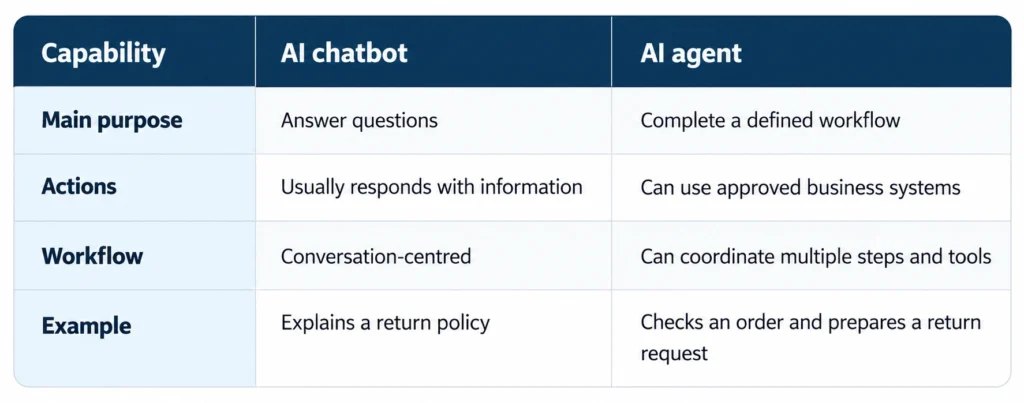
The important distinction is what the system can actually do—not whether it uses a chat window.
7 Real Business Use Cases for AI Agents
1. Sales Agents: Prepare Quotes and Follow Up with Leads
Sales agents can read enquiries, extract requirements, classify leads, retrieve approved product information, prepare draft quotations, create follow-up messages and update CRM records.
Example: A manufacturing company receives multiple enquiries. An agent organises requirements, flags missing specifications and prepares draft quotations for review. Employees spend less time on paperwork and more time working with customers.
Guardrail: The agent must not invent prices, offer unauthorised discounts or commit to delivery dates without verified information and approval.
2. Customer Support Agents: Resolve Routine Requests
Support agents can answer common questions using approved documentation, retrieve order status, classify tickets, suggest troubleshooting steps, summarise conversations and escalate complex cases.
Example: A customer asks about a delayed order. The agent checks the connected order system and prepares a response based on verified shipping information.
For customer-facing applications, SerenialTech’s mobile app development services can support the software components that connect users with business systems.
3. Marketing Agents: Research, Create and Coordinate Campaigns
Marketing agents can research competitors, organise market information, generate campaign ideas, draft blogs and advertisements, prepare content calendars, analyse campaign data and recommend experiments.
Example: For a new product launch, one agent researches competitors, another drafts product content and a third prepares a performance summary. A human marketer reviews content and approves public-facing campaigns.
Case Study Example: A Hermes-Powered Shopify Marketing Workflow
A Shopify store can use a multi-agent workflow built with an AI agent framework such as Hermes to divide marketing work into specialised roles. A competitor research agent gathers information from approved sources; a market research agent organises information about customers and product opportunities; a marketing agent drafts product descriptions, blog outlines and social content; and a sales agent prepares customer messaging and conversion ideas.
A human reviews recommendations before publication or campaign changes. With suitable integrations and permissions, the workflow may connect to Shopify or marketing platforms to retrieve data or prepare actions.
Important: Actual capabilities depend on connected tools, permissions, model configuration and testing. This is an example workflow, not a guarantee of autonomous campaign management or improved sales.
For businesses connecting AI workflows with custom software, explore SerenialTech’s mobile app development services.
4. Reporting Agents: Turn Business Data into Insights
Reporting agents can gather authorised data from spreadsheets, CRM systems and dashboards; compare results with targets; highlight unusual changes; and prepare daily, weekly or monthly summaries.
Example: A weekly sales agent compares results with the previous week, highlights products with the largest changes and prepares a management summary. Use verified sources and preserve metric definitions.
5. Inventory Agents: Monitor Stock and Support Purchasing
Inventory agents can monitor stock levels, sales velocity and reorder thresholds, check supplier lead times, flag shortages and prepare draft purchase orders.
Example: When a product approaches its reorder threshold, the agent checks current stock and supplier lead time, then recommends a purchase quantity for the procurement manager.
Guardrail: Start with recommendations and draft orders; automate purchasing only after controls and reliability have been tested.
6. HR Agents: Support Recruitment and Employee Administration
HR agents can answer routine policy questions, draft job descriptions, organise onboarding checklists, prepare draft letters, send reminders and summarise training material.
Example: An onboarding agent provides links to approved policies, tracks outstanding documents and reminds responsible employees about incomplete tasks.
Guardrail: Hiring, compensation, disciplinary action and termination decisions need appropriate human oversight.
7. Document Processing Agents: Handle Emails, Invoices and Business Records
Document agents can classify incoming documents, extract invoice fields, compare invoices with purchase orders, summarise contracts, route documents and flag missing or inconsistent information.
Example: An agent extracts invoice details, compares them with a purchase order and flags discrepancies for the accounts team before a payment is approved.
Guardrail: Financial transactions and legally significant documents require validation and defined approval procedures.
How to Choose the Right AI Agent
Not every process needs an AI agent. A simple chatbot or conventional automation may be more suitable for predictable, rule-based work.
- FAQs: A chatbot may be enough when the task is mainly answering questions.
- Scheduled reminders: Traditional automation is often best for fixed rules.
- Quotation preparation: An agent can interpret requests and coordinate steps, with approval.
- Reporting: An agent can gather and summarise data when sources and metrics are verified.
- Invoice processing: A document agent can extract and compare information, with validation.
Choose a workflow that is repetitive, measurable and low-risk enough to test. Consider the time it takes today, integration needs, consequences of mistakes and the permissions the agent would require.
Keeping Humans in Control: AI Agent Guardrails
- Limit permissions: Give agents only the access needed for their tasks.
- Require approval: Use human review for publishing ads, changing budgets, sending commercial commitments, payments, purchase orders and consequential HR actions.
- Use trusted sources: Connect agents to approved documents, databases and APIs; flag missing or conflicting information.
- Keep an audit trail: Record important inputs, actions, approvals, outputs and errors.
- Protect data: Review access controls, retention, security and third-party services.
- Monitor performance: Track completion rates, errors, processing time, review effort and cost.
- Provide a fallback: Escalate uncertain or high-risk cases rather than guessing.
The goal is to automate suitable work while keeping people responsible for decisions that matter.
How to Get Started with AI Agents
- Identify one repetitive problem. Choose a task that consumes time and follows a consistent process.
- Map the workflow. Document triggers, information sources, decisions, exceptions and expected outcomes.
- Select the right approach. Choose rule-based automation, a chatbot, a single agent or a multi-agent workflow.
- Connect required tools. Confirm integrations, permissions and data quality.
- Build a small pilot. Start with drafts or recommendations and human supervision.
- Measure results. Track time saved, accuracy, error rate, cost and review time.
- Expand gradually. Add workflows or low-risk actions only after the pilot proves reliable.
For custom applications and integrations, explore SerenialTech’s mobile app development services.
How SerenialTech Can Help
AI agents often require more than an AI model. Businesses may need custom interfaces, backend services, API integrations, databases, authentication, monitoring and secure connections to existing software.
SerenialTech works on mobile, web and IoT application development, including backend and cloud components. Depending on the project, these capabilities can support an AI-powered application, an MVP or connected business workflows.
Learn more about SerenialTech’s mobile app development services or contact SerenialTech to discuss your requirements.
Frequently Asked Questions
What is an AI agent in simple words?
Software that works towards a goal by gathering information, selecting actions and using connected tools within defined permissions.
What is the difference between an AI agent and a chatbot?
A chatbot primarily communicates with users; an agent can also coordinate and execute workflows across connected tools.
Can small businesses use AI agents?
Yes. Small businesses can start with preparing quotations, organising leads, drafting content and summarising reports.
Can AI agents automate an entire business?
They can automate selected workflows, but exceptions, sensitive decisions and accountability usually require human involvement.
Do AI agents need multiple models?
No. One agent can be enough for a well-defined workflow. Multiple agents are useful only when specialised roles add value.
Are AI agents expensive?
Costs depend on complexity, integrations, data quality, security, model usage and maintenance. A small pilot can validate value before scaling.
Are AI agents safe for business use?
They can be used responsibly with access controls, testing, monitoring, data protection and human approval for high-impact actions.
Can AI agents work with Shopify?
Depending on integrations, they can help with product research, content drafts, authorised store data and inventory workflows.
What is a multi-agent system?
A system in which specialised agents coordinate different parts of a larger workflow, often through an orchestration layer.
How should a business start?
Choose one repetitive task, define success, connect only necessary tools, test under supervision and expand based on measured results.
Conclusion: Move from AI Experiments to Useful Business Workflows
AI agents can help businesses move beyond generating text and towards completing practical work across connected systems. They can support sales, customer service, marketing, reporting, inventory, HR and document processing.
Successful implementation requires clear goals, reliable data, suitable integrations, secure permissions and measurable results. Start small, keep people involved where necessary and expand only when the evidence supports it.
Thinking about an AI-powered application or business workflow? Explore SerenialTech’s mobile app development services or contact our team to discuss your project.
Editorial note: Examples describe possible implementations. Actual results depend on system design, integrations, data quality, permissions and human review.
